WingLabs Wheelchair Tilt Monitor (WL-WC-TL28)
$99.99
Touch-screen tilt monitor for manual and powered wheelchairs. Shows forward/back and lateral lean in real time, with configurable warning and danger alerts on screen and with sound. Powered by USB-C, no wiring needed. Free shipping within the US.
Description
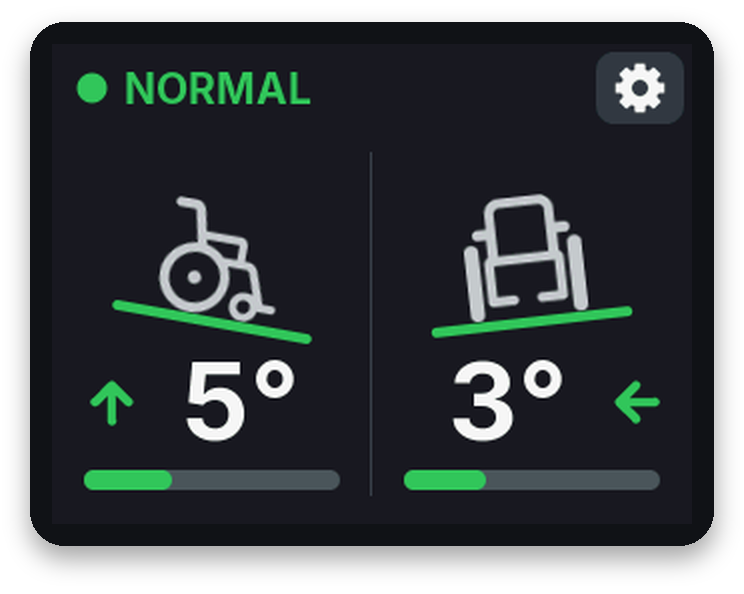
A compact touch-screen tilt monitor for manual and powered wheelchairs. The WingLabs Wheelchair Tilt Monitor shows in real time how far the chair leans forwards or backwards and to the left or right, from its own 6-axis motion sensor. It needs no connection to the wheelchair’s electronics: plug it into a USB port or a power bank and it does the rest.
Set your own warning and danger angles for the chair and the user, and the monitor alerts you with colours and sound before you reach them.
Free shipping within the United States. The box contains the tilt monitor only: use your own USB-C cable and a 5 V USB supply (wheelchair USB port, power bank or adapter, at least 1 A).
Features
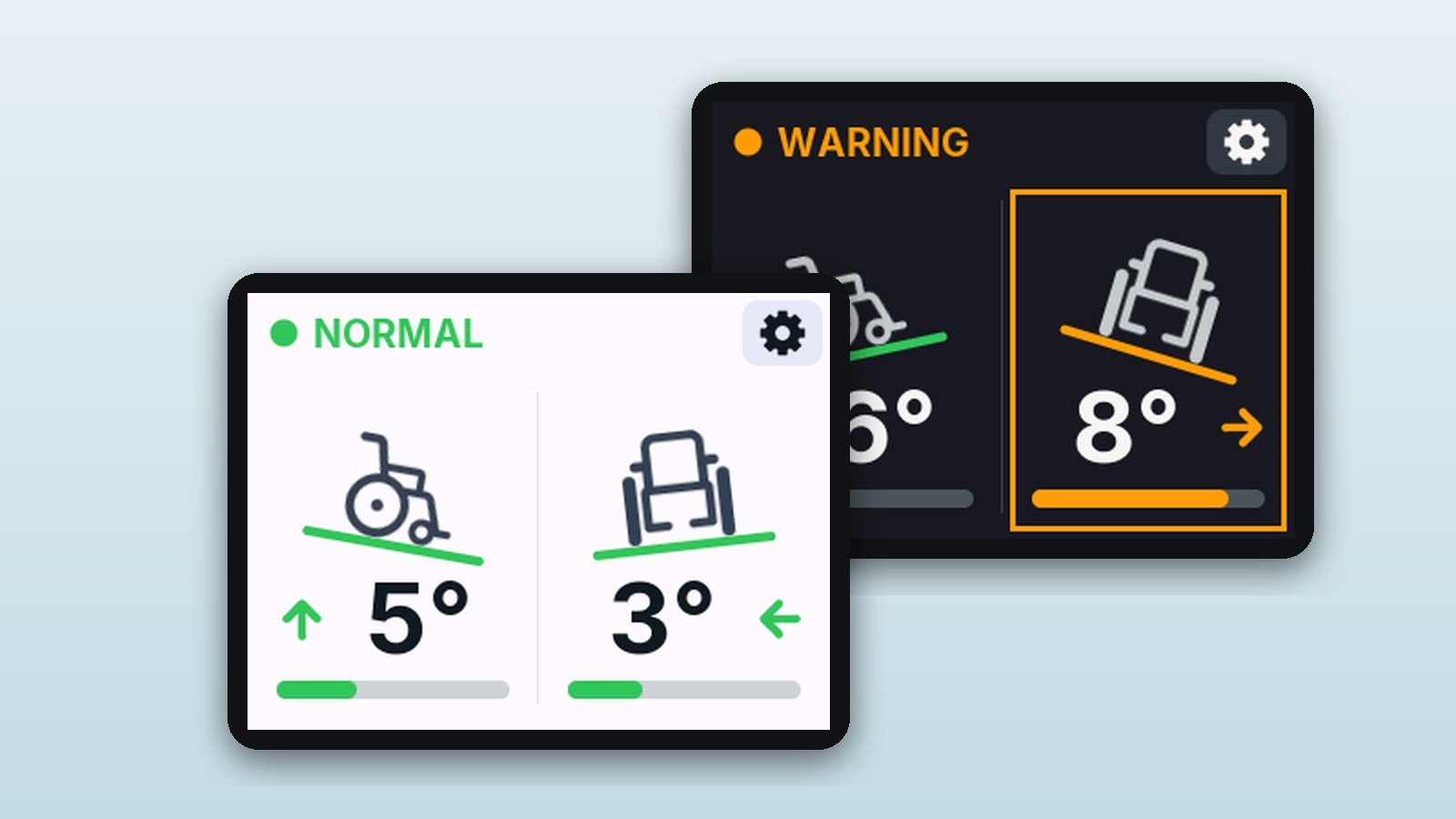
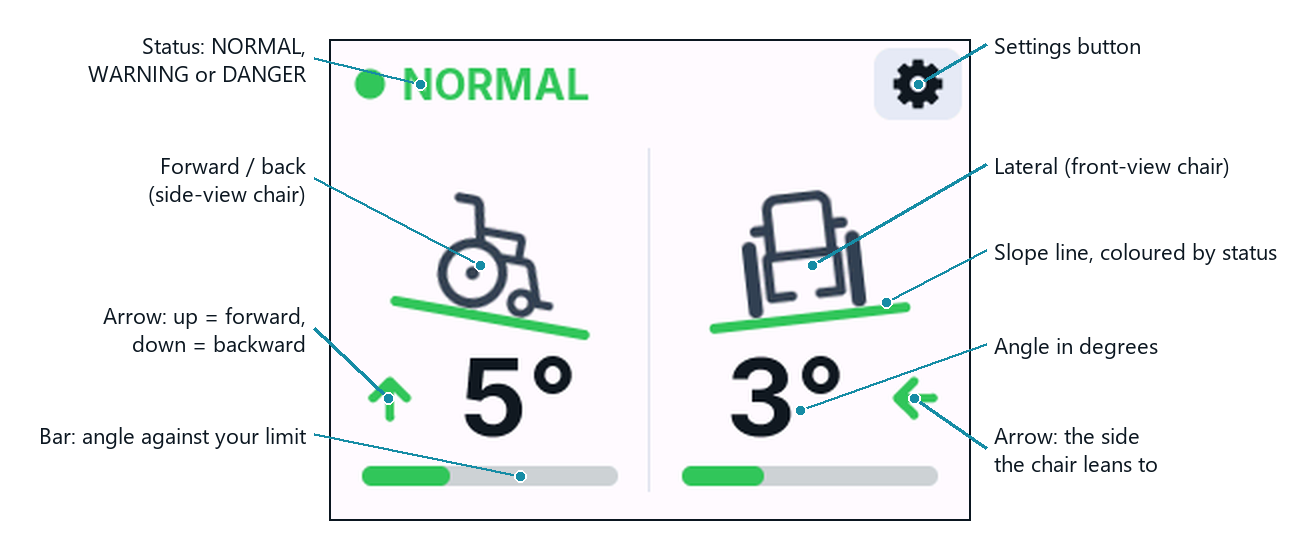
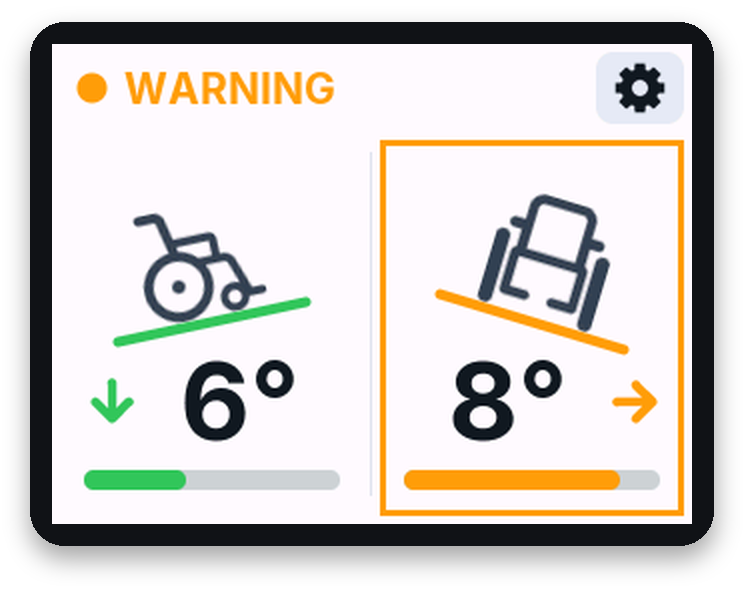
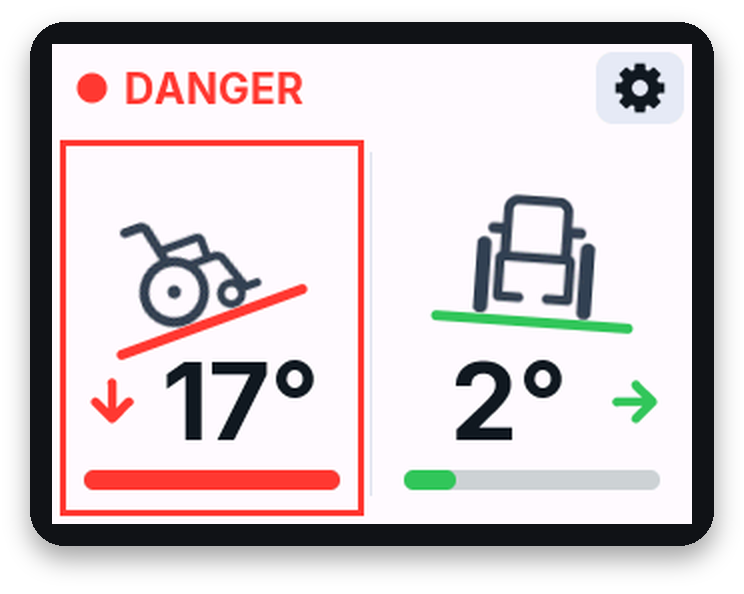
- Two clear panels: a side-view chair for forward/back lean and a front-view chair for lateral lean, with arrows, slope lines and a bar showing how close you are to your limit.
- Configurable tilt alerts: amber WARNING and flashing red DANGER, with separate angles for lateral and forward/back lean and an alert sound that can be switched off.
- 2.8″ colour touch screen with on-device settings: limits, alarm sound, Calibrate level and a light or dark theme.
- Stored level reference: calibrate once on level ground with the user seated; readings stay referenced to it at every power-up.
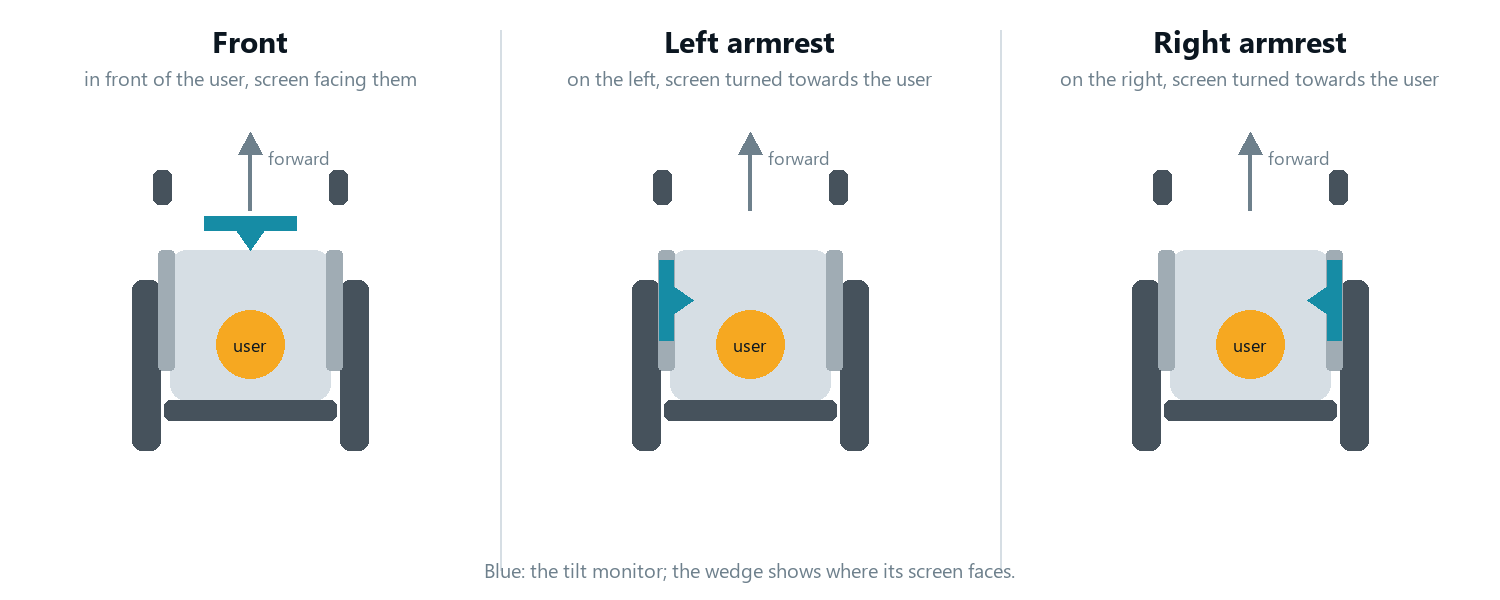
- Mount it where it suits you: in front of the user or on the left or right armrest, with the USB-C port on either side.
- Wi-Fi control panel from any phone, tablet or computer: live values, mount, orientation, level, offset, alerts and firmware updates. No app and no internet needed.
- Authenticity check: every unit carries a unique serial number and a hardware-protected credential.
Specifications
| Model | WL-WC-TL28, landscape display, USB-C on the left or on the right |
| Display | 2.8″ colour IPS LCD, 320 x 240 pixels, capacitive touch |
| Processor | ESP32-S3 dual core, 240 MHz, 16 MB flash, 8 MB PSRAM |
| Motion sensor | QMI8658 6-axis (3-axis gyroscope, 3-axis accelerometer) |
| Readout | Whole degrees on the screen, 0.1° in the control panel |
| Mounting | Front, left armrest or right armrest (selectable); screen upright or leaning back |
| Tilt alerts | WARNING and DANGER, separate lateral and forward/back angles, 2° to 45°; factory lateral 7°/10°, forward/back 11°/15° |
| Alert sound | Built-in speaker, can be switched off |
| Themes | Light and dark |
| Wi-Fi | 2.4 GHz access point, low power (about 7 mW); control panel at 192.168.4.1 |
| Power | 5 V through USB-C, at least 1 A (wheelchair USB port, power bank or USB adapter) |
| Firmware | 0.1.0, updatable over Wi-Fi |
Important
- Use 5 V USB only. Never connect the unit directly to the wheelchair’s battery or wiring: it will damage the unit and is not covered by the warranty.
- Mount it rigidly, clear of transfers, the joystick and other controls, and the user’s view.
- An aid, not a safety or medical device. It does not prevent tipping and does not know when your chair will tip over: always stay within the limits given by the wheelchair manufacturer and use your own judgement.
- Manual and powered wheelchairs
- Power: 5 V USB-C (wheelchair USB port, power bank or USB adapter, at least 1 A)
- NOT for direct connection to the wheelchair's battery or wiring
- WingLabs Wheelchair Tilt Monitor (WL-WC-TL28)
- USB-C cable, power bank and mounting bracket not included
Installation
Mount the monitor rigidly with a wheelchair bracket or clamp, in front of the user or on the left or right armrest, screen facing the user and long side horizontal, clear of transfers, controls and the user's view. Connect it with a USB-C cable to the wheelchair's USB port or a power bank (5 V, at least 1 A). Then choose the mounting position in the Wi-Fi control panel, park on level ground with the user seated, tap Calibrate level, and set your tilt alert angles.
Resources
Does it need to be wired into my wheelchair?
No. It only takes 5 V power through USB-C from the wheelchair's USB port, a power bank or a USB adapter. There is no connection to the wheelchair's electronics.
Does it work on a manual wheelchair?
Yes. Power it from a good-quality USB power bank fixed securely to the chair, for example in a bag under the seat.
At what angles does it warn me?
You set them yourself, on the screen or in the control panel. Factory settings are 7°/10° lateral and 11°/15° forward/back (warning/danger), but set them well below the limits given by the wheelchair manufacturer or the user's clinician.
Can the user stay seated during calibration?
Yes. Only movement of the chair, rocking or touching the unit makes it retry.
Where can I mount it?
In front of the user, or on the left or right armrest with the screen turned towards the user. Select the position in the control panel, then calibrate the level.
How do I connect to the control panel?
Within 60 seconds of power-up, join the WingLabs Wi-Fi network (password winglabs) and open http://192.168.4.1.
Can I update the firmware?
Yes, over Wi-Fi from the control panel using an official WingLabs .bin file for your model. It takes about one minute.
Is it a medical or safety device?
No. It is a visual and audible aid. It does not prevent tipping; always stay within the wheelchair manufacturer's limits.
Only logged in customers who have purchased this product may leave a review.

Reviews
There are no reviews yet.